
How DevOps Is Revolutionizing .NET Application Delivery?
Quick Summary:DevOps is readily shaping how .NET applications are built, tested and deployed. It basically blends development and operations into a single workflow. Through this text we will breakdown how DevOps accelerates delivery, enhances software reliability and strengthens collaboration across the teams. You will get to learn all core concepts, practices, tools and workflows every .NET DevOps developer must know. By the end you will exactly understand how DevOps can transform the entire lifecycle of a .NET application.
Introduction
In the vast world of software development, the need for faster development, testing and deployment process is on surge. People are readily seeking efficient yet faster processes with best results. Hence here’s where DevOps practices are welcomed. Application development requires a keen knowledge and ability to develop a scalable application that is free from threats. This can take up a lot of time but not with .NET DevOps.
.NET development services have now got the power of DevOps to streamline the entire process. It is a combination of principles and tools that streamlined development, enhances collaboration and provides higher quality results. Hence along with speed you also have confidence of reliability. This blog is your guide for .NET DevOps practices to enhance the development process and attain improved efficiency.
Getting to know DevOps and its advantages
DevOps is a combined practice where development and operations are brought together for enhancement in software development lifecycle. It lays emphasis on aspects such as collaboration, automation and continuous improvement for faster development and reliable results in terms of software. Let’s dive into benefits of DevOps:
- Faster-time-to-market: DevOps practices encourage a quick development cycle that even comprises testing and deployment. Hence it allows the .NET application development team to deliver software as soon as possible.
- Enhanced collaboration: DevOps ensures smoother and faster collaboration and transparent communication among team of developers, operation group and other stakeholders. Hence it results in a great workflow.
- Better quality and reliability: It introduces automation to the phase of testing and deployment. Hence helping in identification of problems at an early stage for faster resolution. At the end you get the best quality software with enhanced reliability.
- Scalability and flexibility: DevOps helps you make a scalable software and adds an ability to instantly adapt to altering needs. Hence it lets .NET developers instantly respond to the needs of clients.
Adopt .NET DevOps workflow with Bigscal
- Faster delivery and expert guidance
- Scalable and automation ready solutions
Mastering DevOps: Essential Practices for Modern .NET Development
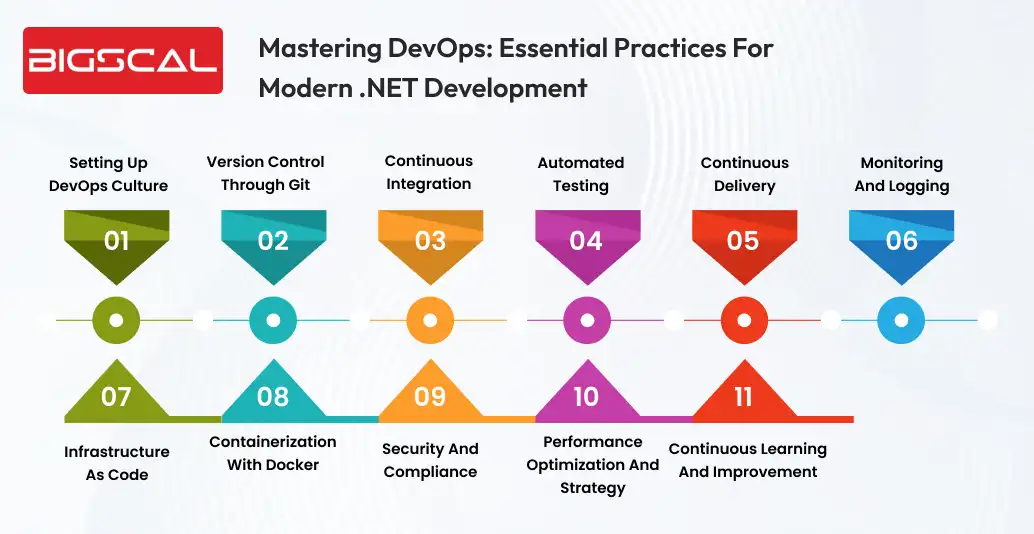
Now you might be aware of the basics of DevOps for .NET. Let’s try to learn how to set it up:
Setting up DevOps culture
- Emphasis on collaboration and communication: DevOps is known to offer and foster an environment of collaboration and communication. It provides encouragement to the team to work with combined effort, share knowledge and understand silos between the development team and the operation one.
- Encouraging shared responsibilities: DevOps practices for .NET maintenance services is known to put forward shared responsibilities throughout development and operation lifecycle. Developers must be a part of the operation phase; on the other hand, the operation team must give their input and support during development.
- Promotion of automation and tooling: Automation plays a very crucial role when it comes to DevOps practices. You must look forward to bag technologies that automate routine tasks like continuous integration, testing and deployment. Hence this makes sure developers are free to contribute to overall efficiency.
Version control through Git
Version control is one of the necessary steps that helps you track any changes, collaborate smoothly with team members and ensure that you have a reliable codebase. Git is one of the well known version control systems employed in the development industry.
For your .NET development project you can create a Git repository to have an eye on changes, manage branches and ensure better collaboration. For hosting .NET software Git repositories you can try services from GutHub, GitLab and Azure DevOps.
Start by establishing a firm branching strategy such as GitFlow or GitHub flow. It can help you manage development methods parallely, provide code review and ensure support release management.
Continuous integration
Continuous integration is a method where the alterations to the code are frequently merged into a central repository and automatically developing and testing them. It helps you spot integration problems at an early stage and ensure rapid feedback to the developers.
Employ tools for CI such as Azure DevOps or Jenkins construct an automated develop and test pipelines. Set the pipeline to trigger on every code commit. Additionally make sure that the .NET application is continuously being tested alongside development.
Automated testing
Unit tests, integration tests, and acceptance tests are examples of automatic testing capabilities that you may incorporate into your continuous integration pipelines to guarantee the application’s functioning. Additionally it helps you identify issues at an early stage in the development process.
Ensure you develop a testable code by sticking to solid principles by using dependency injection. When you design code with testability it can ensure providing a complete test coverage and provides automated testing. Make use of testing frameworks such as NUnit or xUnit to develop and execute automated testing code. They boast a powerful set of features that can organize text, employ test cases and generate reports.
Continuous delivery
Continuous Delivery systems might be an extension of CL. It is helpful in providing an automatic deployment process and ensuring reliable production with minimum need of manual management. You can also use configuration management tools such as Ansible, Puppet, Powershell DSC and more. Additionally use infrastructure as code to define provision infrastructure in a consistent and reproductive manner.
Employ release management tools such as Azure DevOps or Octopus Deploy for configuring CID pipelines and ensuring best deployment across different environments. As a result, it offers version control for release components and configuration.
Monitoring and logging
One of the best practices is providing monitoring and logging practices to seek insights into the working of application behaviour, spot issues and troubleshoot issues urgently. Hence it ensures the health and performance of your .NET application. Integrate logging framework such as Serilog or NLog to gain relevant log information such as critical events, errors and performance data.
Make sure to log in order to record all relevant data. Utilize tools like Prometheus or Azure Application Insights to gather and evaluate metrics, track the health of apps, and gain insight into the functionality and performance of your desktop .NET program.
Use synthetic monitoring for simulating user actions and catch the issues before real users experience them.
Infrastructure as code
Infrastructure as code makes use of infrastructure provision and management as code. It lets you use declarative configuration files for defining and deploying infrastructure resources. Employ tools such as Terraform or Azure resource manager for defining and provision infrastructure resources like virtual machines, networks and storage. Changes in infrastructure can be version controlled, tested and deployed into your DevOps workflow.
Employ IaC to ensure and manage consistent infrastructure changes throughout different environments. Automate process of scaling to handle rise in application demand.
Containerization with Docker
Containerization makes sure that the application and its dependencies are packed into lightweight and different containers. Docker is one of the most popular choices for this process. Containerize .NET application by developing Docker images. Employ Dockerfiles to check for dependencies, develop steps and runtime environments. Docker images make deployment processes simpler and ensure consistent execution throughout different environments.
Employ different platforms for orchestration such as Kubernetes or Docker Swarm for deploying and managing containerized applications at scale. These platforms help you with advanced features such as scaling, balancing loads and higher availability.
Security and compliance
Leverage security practices like secure coding principles, scanning vulnerabilities and penetration testing in your DevOps workflow. Make security responsibility for everyone from the development and operations team. Make sure you adhere to industry specific compliance regulations and standards for your .NET software development such as GDPR or HIPAA. Follow necessary rules and controls to ensure compliance.
Bring automation for security testing and scanning vulnerabilities into your CI/CD pipelines. Ensure using tools such as OWASP ZAP or SonarQube for finding and addressing security issues in .NET applications.
You can also leverage tools such as Microsoft Teams, Slack or more for better communication, real time updates and enhanced collaboration within development teams and stakeholders.
Agile project management tools such as Azure Boards of Jira can be used for planning, tracking and managing development tasks and user feedback. These tools can help you be sure about progress, assign tasks and provide better project management.
Employ knowledge sharing and documentation platforms for capturing and distributing crucial project data, technical documentation and best practices.
Performance optimization and strategy
It is possible to enhance performance of .NET applications by using performance optimization methods such as caching, code profiling and database tuning. Keep an eye on performance of applications for sensing gaps for improvement and make changes accordingly.
Use scaling strategies as per application demands. You can employ horizontal scaling by adding multiple instances of your own application or vertical scaling by adding resources on existing instances for handling increased workload.
You can test workload with tools such as Apache JMeter or Gatling for simulation of scenarios where traffic is high. Hence it helps measure how application performs under stress. Keep monitoring performance with the help of tools such as Azure Monitor or New Relic for having insights on performance and optimal usage.
Continuous learning and improvement
Make sure to foster a culture where continuous learning is encouraged along with innovation and improvement. Adopt a growth mindset to leverage new technologies, use new approaches and intend to continuously enhance development workflow.
If knowledge sharing is faster within the team it could lead to better results. Ensure to have regular technical discussions, cross training, and educational workshops. Encourage your team of .NET developers to stay updated with the latest industry specific trends, attend conferences and be a part of online communities.
Gather and analyze all the data on the development cycles, frequency and response to incidents. Make sure to use these feedbacks from users, members and stakeholders for identification of problems and room for improvement.
Conclusion
DevOps practices have surely brought a new era of revolution in software development. It has enabled teams to develop, deploy and test applications at a higher speed with better quality. This blog has everything you need to know about implementing DevOps into your .NET application development. It helps you as a developer to understand how to embrace this methodology and enhance development workflow.
By using these practices for your workflow it is pretty sure that you can expect enhanced collaboration among teams, automate processes and deliver results more efficiently. Hence ultimately using .NET DevOps can lead you towards efficiency in terms of better outcomes for your next project. Embrace the high end benefits of DevOps and unlock a new feature for your software development in this fast paced world. You can always hire .NET developers to be an extra addition for implementation of DevOps.
FAQ
How do you implement CI/CD in .NET projects?
Employ tools such as Azure DevOps, GitHub Actions, or Jenkins to automate build, test, and deployment pipelines. Code commits trigger automated builds and staged deployments.
What tools are commonly used in .NET DevOps?
Popular tools include Azure DevOps, Git, Docker, Kubernetes, Jenkins, SonarQube, NUnit, xUnit, and Application Insights.
Why is DevOps crucial for .NET app development?
DevOps improves delivery speed, enhances code quality, boosts team collaboration, and ensures reliable deployments for .NET applications.
How does automated testing help in .NET DevOps?
Automated testing helps catch issues earlier, reduces manual testing efforts, and ensures stable, faster, and more reliable releases.
What is the role of Docker in .NET DevOps?
Docker packages .NET applications into portable containers for consistent execution across environments and simplified deployment.
How do I ensure security in a .NET DevOps pipeline?
Use tools like SonarQube, OWASP ZAP, and automated vulnerability scanning within CI/CD. Follow secure coding practices and comply with standards such as GDPR or HIPAA.
How does Infrastructure as Code benefit .NET DevOps?
IaC tools like Terraform or ARM templates automate infrastructure provisioning, reduce configuration errors, support versioning, and ensure consistent deployments.
How can monitoring improve .NET DevOps performance?
Tools like Azure Application Insights and New Relic provide real-time insights for detecting issues quickly and maintaining strong application performance.
Is DevOps suitable for a small .NET team?
Yes. Even small .NET teams benefit from automation, improved collaboration, faster delivery cycles, and fewer production issues.
What skills are necessary for adopting .NET DevOps?
Essential skills include Git, CI/CD pipeline management, automated testing, containerization, cloud platforms, and basic scripting.






