
How to Implement Exception Handling in .NET Like a Pro?
Quick Summary: This blog aims to help you gain knowledge of .NET error handling beyond just using basic try-catch blocks. You will additionally get to learn how exceptions function in the CLR and when you should catch or rethrow then. Further it will also help you gain ideas on common pitfalls to avoid and how it can result in failure. By the end you will be aware of how to develop a resilient .NET application that can deal with real world queries gracefully and predictably.
Introduction
Exception handling in .NET development services is necessary for development of an application that remains stable and reliable even in a situation of failure. It helps developers catch failures at an early stage, manage them effectively and enhance crucial workflows. It helps ensure smoother database transactions and API calls without compromising integrity of the system.
Although achieving this level of reliance needs more than just some random try catch blocks. You ought to have a perfectly structured .NET error handling strategy. Applications are highly vulnerable to get prey to unhandled exceptions, cause resource leakage and inconsistent states. These risks can enhance with database driven systems where even a single failure can result in disturbance in the dependent services and trade off data integrity.
This text will be a guide for you to ensure .NET error handling with the help of exceptions, ensure robust try-catch-finally and define custom exception types. Let’s get going towards a better error management approach.
Understanding exceptions in .NET
Exception handling in .NET are runtime events that hamper the execution of normal workflows. These typically occur when something out of the ordinary happens, such as dividing by zero or trying to connect to a database while accessing a null object. The Common Language Runtime generally handles these exceptions by using a structured exception handling model.
As a result, the CLR automatically unwinds the call stack if an exception arises. Hence it will skip all the method calls till it finds the perfect call block. It lets you handle errors at the right level of application instead of where it occurred. Each exception is an object that derives from the base class “System.Exception.” These objects tend to have objects such as diagnostic details, messages, stack trace and certain error codes. It might also include InnerException for chained failure.
Additionally, a template is expandable; you may create unique exceptions that correspond with business logic, which facilitates the tracking and reasoning of system failures. The guide will then cover the foundation of resilient .NET application development, including how to catch, organize, and escalate exceptions.
Ensure to use exceptions at the point where you can take clear corrective measures. And ensure that rest can safely propagate upwards.
Best practices to implement exception handling in .NET
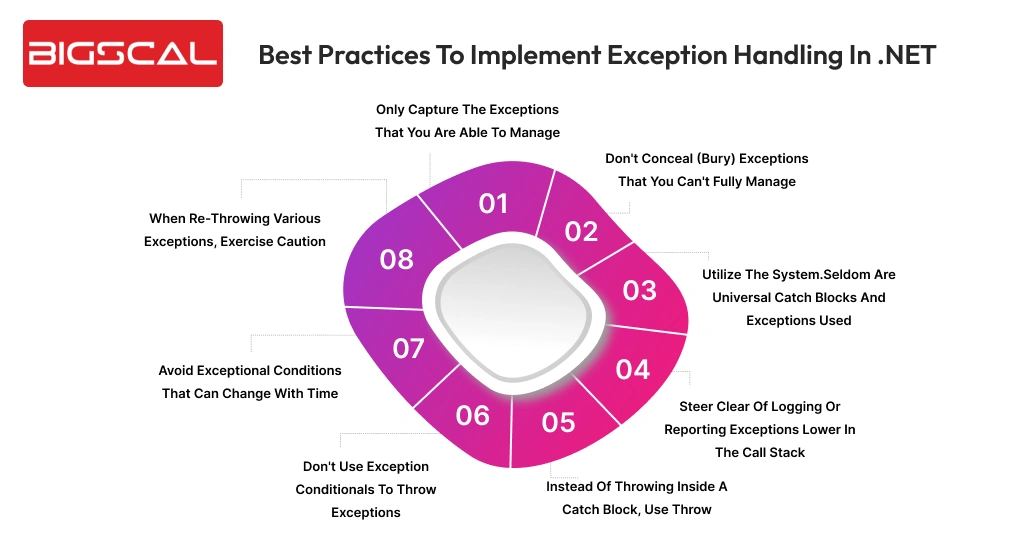
Only capture the exceptions that you are able to manage
Overall, developers can address some types of exceptions, while others remain unmanageable. E.g. when a file is already in use, when opening it in read-write and exclusive mode, it may cause a System.IO.IOException. Hence, when this type of problem occurs, the code can alert the user that the file is already in use.
Additionally it gives them an option of either canceling the process or trying it once more. The exceptions that are to be caught should be limited to those that have a known action. You should limit caught exceptions to those with a known action, while higher-level callers should handle all other types of exceptions.
Don’t conceal (bury) exceptions that you can’t fully manage
Novice programmers are often tempted to handle all exceptions. Also later they continue this as opposed to letting the user know about an unhandled exception. However, this may lead to grave system problems remaining unnoticed. Hence exceptions should be re-thrown instead of catching them and keeping them concealed to the caller until the code explicitly deals with an exception or specifically concludes that certain exceptions are non-perilous. Catch blocks of the form catch(System.Exception) and the general catch blocks should frequently be placed higher in the stack. You can avoid it unless the block is terminated by re-throwing the exception.
Utilize the system.Seldom are universal catch blocks and exceptions used
Almost all exceptions have their source in System.Exception. However, the best way to deal with them is to allow some to escape or bring the program to a graceful end as quickly as possible. Two examples of such exceptions are System. OutOf MemoryException and System. StackOverflowException. These exceptions were defaulted to unrecoverable in CLR 4, that is to say, when they were simply caught without being thrown a second time, the CLR would still rethrow them.
To recover such runtime exceptions, the developer cannot write code that will recover them. Consequently, the run time will force the program to come to a close in CLR 4 and beyond which is the most appropriate. Only code written before CLR 4 can catch such exceptions to run cleanup or emergency code, such as storing volatile data, before the program terminates or rethrows the exception using `throw`.
Steer clear of logging or reporting exceptions lower in the call stack.
It is a common temptation of programmers to write down errors or inform the user about exceptions in the least amount of time possible in the call stack. However, these sites often have to rethrow the exception because they cannot manage it completely. Therefore, when these catch blocks are at the bottom of the call stack, they shouldn’t log the exception or notify the user.
Additionally record exceptions multiple times in log recordings because the higher in the call stack callers log with the same exception and rethrow it. Worse still, it may not even be appropriate to this type of application presenting the exception to the user.
The Windows application requires the use of System.Console.WriteLine to do so. As an example, in a Windows application, the user will never see WriteLine() and the displaying of a dialog in an unattended command-line run operation might go undetected and terminate the application. Moreover the user interfaces related to logging and exceptions should be stored to be used at higher levels in the call stack.
Instead of throwing inside a catch block, use throw
Exception re-throw in a catch block. An example of this is that a call that throws an exception may be a part of the catch (ArgumentNullException exception). Rather than rethrowing the main throw point location, rethrowing this exception in this way will restore the stack trace to where the re-thrown call was. In order that the same exception can be propagated up the call stack, one should use throw in .NET software development. On the other hand, they either are re-throwing a different type of exception, or intentionally masking the original call stack.
Don’t use exception conditionals to throw exceptions
Using exception-throwing code to define an exception conditional is not recommended. When developers do this, the system may ignore real exception occurrences and generate false conditions. Complex conditional checks should be moved to a different function and included in a try/catch block that appropriately handles the exception in order to prevent this.
Avoid exceptional conditions that can change with time
When code uses an exception condition to test values such as exception messages that may change due to localization or message updates, it may fail to catch the expected exception, unintentionally altering the business logic. Additionally on this account, make sure that conditions of exceptions are valid over time.
When re-throwing various exceptions, exercise caution.
Any re-throwing of an exception within a catch block will also hide the old exception as well as override the point of throw. Hence assign to the InnerException property of the new exception, which is frequently assignable through the constructor, the previous exception. Additionally, you must throw the exception only under the following circumstances:
- The problem will be more evident under the condition of changing the type of exception. In cases where the file with the user list is not available, say, it would be preferable to throw some other form of error instead of propagating System.IO.IOException when making a call to Logon(User user).
- The initial exception contains personal data. Hence you must wrap the exception in this case if the original `System.IO.IOException` includes a file path, because it discloses confidential system security information. This, of course, assumes that the system does not configure `InnerException` with the original exception. Interestingly, some very early pre-alpha versions of CLR v1 inserted an exception stating, “Security exception: Moreover you are not authorized to decide what to do with c:\temp\foo.txt.”
- The caller receives an exception that is too specialized and therefore cannot handle it properly during normal application execution flows. Additionally, to remove database-specific code that appears later in the call stack, such as database support services exceptions. The system throws a more general exception instead of throwing an exception that remains specific to a particular database system.
Build Better .NET Apps with Bigscal
- Scalable .NET development
- Reliable error handling
Conclusion
To conclude robust exception handling for .NET maintenance services is fundamental for application health. It’s not all about just spotting errors, instead creating a code that anticipates failure, saves context and lets systems work or fail in a predictable manner.
This guide has all best practices for handling exceptions in .NET. You will get to know how you can spot errors and deal with them appropriately. When you use these patterns well it will not only prevent crashes but ensure your codebase is cleaner, easy to maintain and ready to deal with real world complexity.
If your application interacts with the database it’s time to dig deeper. With the aid of diagnostic error, typed exceptions and support for real world failure scenarios it can resolve everything including timeouts and transaction conflicts.
You can initially begin by checking your exception handling. Check if there are any overtly broad catches, ignored errors that specify the provider. Employ dotConnect to seal the gaps and strengthen the system.
FAQ
What’s the best way to handle exceptions in .NET Core? You can employ try-catch-finally blocks, catch only manageable exceptions that will let critical ones bubble up.
What is .NET error handling? .NET error handling is the process that includes detection, management and responding to runtime exceptions for ensuring application is stable.
Why is exception handling important in .NET applications? It can help you avoid crashes, protect data integrity and provide predictable application behaviour without failures.
What is an exception in .NET? An exception is a runtime error that is represented as an object that is derived from System.Exception.
How does CLR handle exceptions in .NET? CLR will ensure to unwind the call stack until it finds suitable catch blocks for handling exceptions.
Should I catch all exceptions in .NET? No, you can only catch exceptions that you can handle meaningfully. Later rethrow others to a higher level.
What if exceptions are ignored? In case if exceptions are ignored it can lead to hidden bugs, resource leaks and inconsistent application states.
When should custom exceptions be used in .NET? Employ custom exceptions for representing business specific errors to ensure clarity and debugging.
What is the purpose of InnerException? It can help you save original error details when you wrap one exception into another.
What is the correct manner to rethrow exceptions? You can use “throw;” instead of “throw ex” for preserving the original stack trace.






