bigscal-logo
  • bigscal-logo
  • Services
    • Software Development
          • Software Product Development
            • SaaS Consulting
            • MVP Development
            • Startup Product Development
            • Product UI/UX Design
            • Startup Consulting
          • Information Technology Consulting
            • Agile Consulting
            • Software Consulting
            • Data Analytics Consulting
            • CRM Consulting
          • Software Outsourcing
            • IT Staff Augmentation
            • Dedicated Development Teams
            • Shadow Engineers
            • Offshore Software Development
            • Offshore Development Center
            • White Label Services
          • Custom Software Development
            • Enterprise Software Development
            • Nearshore Software Development
          • Digital Transformation
    • Application Development
          • Mobile App Development
            • React Native App Development
            • iPhone app development
            • Android App Development
            • Flutter App Development
            • Cross Platform App Development
            • Xamarin App Development
          • Web Development
            • Website & Portal Development
          • Frontend Development
            • Angular Development
            • React.js Development
            • Next.js Development Services
          • Full Stack Development
            • MEAN Stack Development
            • MERN Stack Development
          • Backend Development
            • .NET Development
            • Node js Development
            • Laravel Development
            • PHP Development
            • Python Development
            • Java Development
            • WordPress Development
            • API Development
            • SharePoint Development
          • Cloud Application Development
            • Serverless Software Development
          • Application Maintenance
          • Application Modernization
    • QA & Testing
          • Penetration Testing
          • Usability Testing
          • Integration Testing
          • Security Testing
          • Automated Testing
          • Regression Testing
          • Vulnerability Assessment
          • Functional Testing
          • Software Performance Testing
          • QA Outsourcing
          • Web Application Testing
          • Software Quality Assurance Testers
          • Mobile App Testing
          • QA Consulting
          • Application Testing
    • eCommerce
          • eCommerce Web Design
          • Ecommerce Consulting
          • Digital Consulting
          • eCommerce Web Development
          • Supply Chain Automation
          • B2C eCommerce
          • B2B Ecommerce
    • Analytics & DevOps
          • Big Data Consulting
          • Business Intelligence Consulting
          • Microsoft Power BI
          • Power BI Implementation
          • DevOps Consulting
          • Amazon AWS
          • Microsoft Azure
    • Generative AI Development Services
          • Agentic AI Services
          • AI-ML Developers
          • Hire AI Developers
          • Machine Learning Developers
          • Deep Learning Development
          • IoT Developers
          • Chatbot Developers
          • AI Voice Agent Development Company
  • Industries
    • Education & eLearning
    • Finance
    • Transportation & Logistics
    • Healthcare
      • Hospital Management Software Development
      • Patient Management Software Development
      • Clinic Management System
      • Telemedicine App Development Solutions
      • EMR Software
      • EHR Software
      • Laboratory Information Management Systems
    • Oil and Gas
    • Real Estate
    • Retail & E-commerce
    • Travel & Tourism
    • Media & Entertainment
    • Aviation
  • Hire Developers
    • Web Developers
          • Hire .Net Developers
            • Hire ASP.NET Core Developers
          • Hire Java Developers
            • Hire Spring Boot Developers
          • Hire Python Developers
          • Hire Ruby On Rails Developers
          • Hire Php Developers
            • Hire Laravel Developers
            • Hire Codeigniter Developer
            • Hire WordPress Developers
            • Hire Yii Developers
            • Hire Zend Framework Developers
          • Hire Graphql Developers
    • Mobile Developers
          • Hire Android App Developers
          • Hire iOS App Developers
          • Hire Swift Developers
          • Hire Xamarin Developers
          • Hire React Native Developers
          • Hire Flutter Developers
          • Hire Ionic Developers
          • Hire Kotlin Developers
    • Javascript Developers
          • Hire AngularJS Developers
          • Hire Node JS Developer
          • Hire ReactJS Developer
          • Hire VueJs Developers
    • Full Stack Developers
          • Hire MEAN Stack Developer
          • Hire MERN Stack Developer
    • Blockchain & Others
          • Hire Blockchain Developers
          • Hire Devops Engineers
          • Hire Golang Developers
  • Blogs
  • Careers
  • Company
    • Our Portfolio
    • About Us
    • Contact
  • Inquire Now
  • Menu Menu
Home1 / Blogs2 / Cross Platform3 / An Introduction To Building Desktop Applications With Electron
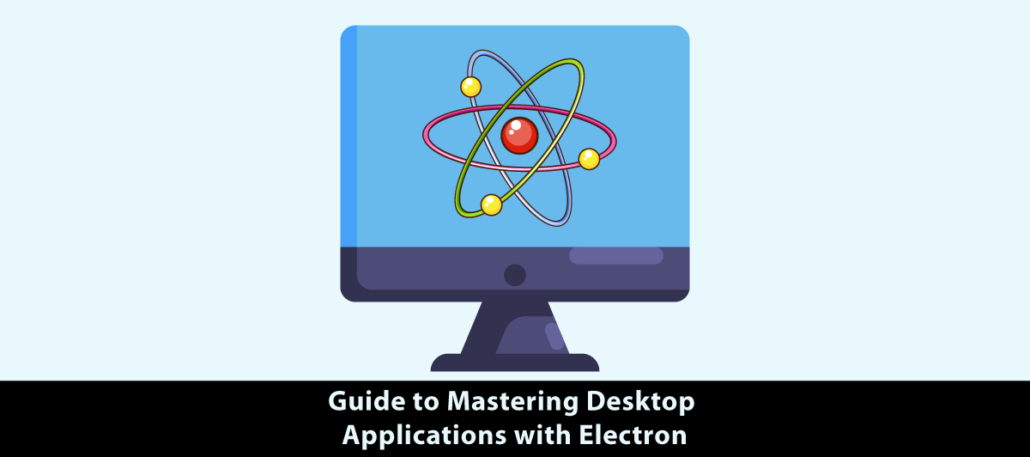
guide to mastering Desktop Applications with Electron

An Introduction To Building Desktop Applications With Electron

August 22, 2022/0 Comments/in Cross Platform /by Dhrumil

Quick Summary: Through this blog, it is an Electron’s power you will see. Check if it makes the setting development on leading desktop platforms easy. Make use of how this framework can develop cross-platform apps that utilizes their web technology familiarity. The use of Electron will be the starting point of our trip to harvest all imaginable features of the technology for your software projects. Some of the featured text on the main page read, “Begin creating cool desktop apps today!”

Introduction

As for Whatsapp, Slack, and Visual Code Studio desktop versions you are more familiar with. Right? But have you also considered the other three widespread applications’ we all use? Thus, there is an overlap among these three particles and it is known as Electron. Js. While these apps are guided as Electron JS. It fills in the gap between the web and the desktop by dozing off the barriers to creating cross-platform apps for Linux, macOS, and Windows. There is no need to research into the intricate details and solve issues of each platform, all of this is now easier through Electron.

However, you need a basic understanding of Node.Js, and if you still need to, then approach Node Js Development Services or hire Node.js developers.

But before all that, read this article.

Why Should You Use Electron.Js?

Electron.js is an open-source framework. It is an outstanding platform for creating desktop apps. It uses web technologies such as HTML. CSS, and JavaScript.  Github maintains Electron. js reassures us that it is not just a mock project, but a serious job of highly experienced professional programmers. Electron.js can produce installers for all platforms from a single codebase, eliminating the need for installation. As a result, an application for certain platforms can be developed by a single development team. Another important benefit is that if you can construct a website with Electron.js, you can build a desktop program with it, therefore existing web developers/web development teams can quickly transition to desktop software developers.

Building An Electron.Js Application: Prerequisites

To start building apps with Electron.js, you’ll need the following items:
1. Basic proficiency of HTML.CSS, and JavaScript
2. Your system has Node.js installed.
3. Basic familiarity with Node.js
It would also help if you were to Prevent Crashing In Electron App.

Structure Of An Electron.Js App
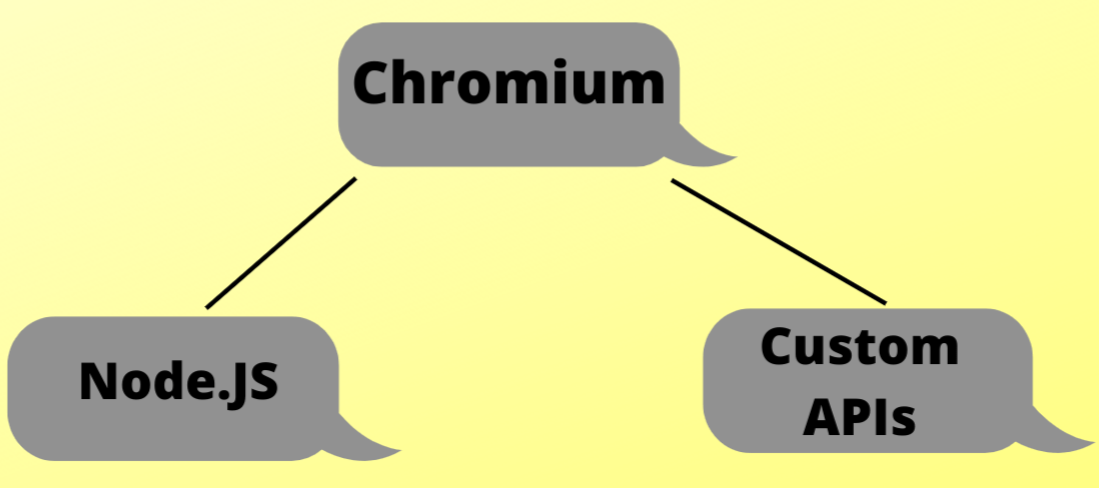
Structure of an Electron.js App Bigscal

1. Chromium is part of the Electron.js stack that is in charge of producing and displaying web pages. Web content is rendered in Electron.js’s Renderer process (more on this later), and you have access to all browser APIs and development tools, exactly like you would in a regular Google Chrome browser, thanks to the Chromium environment.

2.Node.js is the Electron.js component that offers you access to system features. Electron.js runs Node.js in its Main process (more on this later), allowing you access to everything Node.js has to offer, including filesystem interaction, operating system interaction, and more…

3.Electron.js includes an API of easy-to-use modules that allow you to do activities like building and showing a context menu, displaying desktop alerts, working with keyboard shortcuts, and more to enable developers to construct standard desktop experiences and interact seamlessly with native functions.

The Main And Renderer Processes
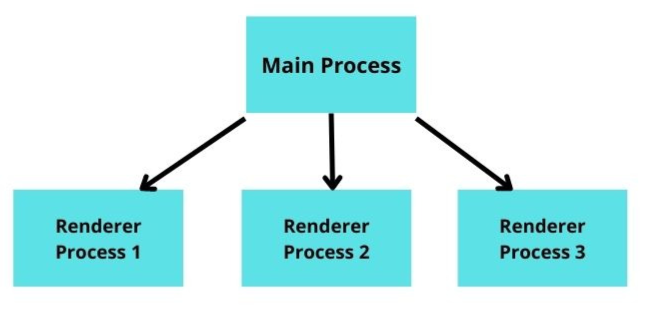
Main Process Bigscal

The Main process, which is basically a Node.js environment, is where an Electron.js application starts. This is where all native functionality interaction takes place.

The main procedure is in charge of producing web pages. It accomplishes this by establishing a new Electron.js BrowserWindow object. This has a new web page with its own Renderer process. Electron.js apps typically start with a default web page that serves as the app’s launch screen. If your program requires it, you can add more displays.

Each Renderer process is in charge of its own web page and is entirely separate from the other Renderer processes and the Main process. As a result, if one Renderer process dies, it has no effect on the other Renderer processes. By removing its BrowserWindow instance, a Renderer process can likewise be terminated from the Main process.

Electron Security – What Every Developer Must Know

1. Why Electron Security Matters More Than Traditional Web Security

Imagine your web application has xss vulnerability. Damage may be limited. However, in electron applications, the same vulnerability can reach file system access and system commands. Therefore, treating electron security as normal browser security can be a dangerous mistake.

Why security is critical:

  • Access to local files
  • System-level capabilities
  • Higher security risks
  • Desktop application privileges
  • Greater attack surface

2. Disable nodeIntegration to Reduce Security Risks

Many beginners enable nodeIntegration for their convenience. This helps them directly access Node.js APIs from the renderer process. This seems easy in development. However, it creates unnecessary security risks in production applications.

Best practices:

  • Keep nodeIntegration: false
  • Avoid direct Node.js access
  • Use preload scripts
  • Limit renderer privileges
  • Follow Electron defaults

3. Enable contextIsolation For Better Process Separation

The electron renderer and preload script handle different responsibilities. If both share the same javascript context. Then malicious scripts can indirectly reach privileged APIs. contextIsolation can significantly reduce these risks.

Benefits include:

  • Better process isolation
  • Protected preload scripts
  • Reduced attack surface
  • Improved application security
  • Safer API exposure

4. Expose Only The APIs Your Renderer Actually Needs

It is not good design-wise to expose the whole system’s capabilities. directly to the renderer process. Firstly, developers should apply the principle of least privilege. Share only APIs that are really needed for application-specific features.

Expose only:

  • Required APIs
  • Safe utility methods
  • Controlled IPC functions
  • Read-only operations (where possible)
  • Minimal permissions

Why Electron Gets Criticism and How to Fix It

1. Why Electron Apps Feel Heavy At Startup

Full chrome browsers are bundled with electrons. Therefore, an empty app can roughly take 50–120MB installed size. That’s the reason electrons are often called heavy framework.

Why this matters:

  • Larger install size
  • Higher memory usage
  • Slower startup perception
  • More system resources needed
  • Real criticism from users

2. Lazy Load Modules To Speed Up Launch

Loading unnecessary modules at the time of app launch causes unavoidable delays. Better approach is to load them later.

Best practices:

  • Move non-critical requires inside functions
  • Load modules only when needed
  • Keep startup path minimal
  • Avoid blocking initialization
  • Reduce launch delay

3. Use Worker Threads for CPU-Heavy Tasks

If heavy computation is there in the main task. Then the UI mostly gets frozen. The app seems unresponsive. The worker shifts the thread computation in the background. Making the thread smooth and responsive.

Use Worker Threads for:

  • Image processing
  • Data parsing
  • Encryption tasks
  • Large calculations
  • Background computations

4. Reduce IPC Frequency to Prevent Bottlenecks

Sending continuous IPC on mousemove, keystroke and scroll events can create communication bottlenecks. Sending every tiny update can be expensive. Especially when there is high traffic between the renderer and the main process.

Optimize IPC by:

  • Debouncing frequent events
  • Throttling repeated calls
  • Sending only necessary data
  • Avoiding noisy updates
  • Reducing message volume

5. Create Windows and Web Content Only When Needed

Unnecessary web content and hidden browser windows use up memory. whether or not users view them.

Memory-saving habits:

  • Create windows on demand
  • Destroy windows after use
  • Avoid keeping hidden windows alive
  • Load content only when required
  • Free unused resources quickly

Conclusion

I hope the above article provides you powerful insights on electrons. If developers follow lazy loading, Worker Threads, IPC optimization and on-demand window creation. Electronic app startups will then be quick. The user interface is responsive. Reduce the amount of memory used

FAQ

Why is Electron Slow?

Chrome OS uses the chromium web browser (using a considerable memory amount). In the multi-tier process of Electron, it may take up even more of the resources. With diligent optimizations and sustainable coding processes risks of the performance impediments are going down.

How to build Electron forge?

Install npm and Node.js. Install npm and Node.js. For your project, make a new folder. For your project, make a new folder. Run npm init electron-forge to set up a new Electron Forge project. You will be asked to set up your app.Run `npm run make` to compile your Electron app for distribution. Run npm init electron-forge to set up a new Electron Forge project. You will be asked to set up your app.Run `npm run make` to compile your Electron app for distribution.

Does an electron require a node to be installed?

Indeed, Electrons need node installation as well. Electron is based on Node.js. Runs JavaScript syntax. Developers need Node.js in order to design. Build. And running Electron applications. It is a necessary precondition for utilizing Electrons.

Seeking robust and scalable software solutions?

Contact us for industry-leading development services.

Book a 30 min FREE Call

Subscribe for
weekly updates

    privacy-policy I accept the terms and conditions

    Categories

    • .Net
    • AI-ML-Blockchain
    • Aviation
    • Backend
    • Cloud
    • Cross Platform
    • Cyber Security
    • Database
    • DevOps
    • Digital Marketing
    • Ecommerce
    • Education Industry
    • Entertainment Industry
    • Fintech Industries
    • Frontend
    • Full Stack
    • Game Development
    • Generative AI
    • Healthcare Industry
    • Latest Technology News
    • Logistics Industry
    • Mobile app development
    • Oil And Gas Industry
    • Plugins and Extensions
    • QA & Testing
    • Real Estate Industry
    • SaaS
    • Software Development
    • Top and best Company
    • Travel industries
    • UI UX
    • Website Development

    Table of Content

    bigscal-technology
    india
    1st Floor, B - Millenium Point,
    Opp. Gabani Kidney Hospital,
    Lal Darwaja Station Rd,
    Surat – 395003, Gujarat, INDIA.
    us
    1915, 447 Broadway,
    2nd Floor, New York,
    US, 10013
    +91 7862861254
    [email protected]

    • About
    • Career
    • Blog
    • Terms & Conditions
    • Privacy Policy
    • Sitemap
    • Contact Us
    © Copyright - Bigscal - Software Development Company
    Techimply reviews
    Google reviews
    DMCA.com Protection Status
    GoodFirms Badge
    clutch-widget

    Schedule a Meeting

    Are you looking for the perfect partner for your next software project?

    Google reviews GoodFirms Badge clutch-widget
    • IP Rights, Security & NDA. Full ownership and confidentiality with robust security guaranteed.
    • Flexible Contracts & Transparency. Tailored contracts with clear and flexible processes.
    • Free Trial & Quick Setup. No-risk trial and swift onboarding process.

      Stay With Us

      Are you looking for the perfect partner for your next software project?

      Google reviews GoodFirms Badge clutch-widget
      • IP Rights, Security & NDA. Full ownership and confidentiality with robust security guaranteed.
      • Flexible Contracts & Transparency. Tailored contracts with clear and flexible processes.
      • Free Trial & Quick Setup. No-risk trial and swift onboarding process.

        Scroll to top

        We use cookies to ensure that we give you the best experience on our website. If you continue to use this site we will assume that you are happy with it.

        AcceptHide notification onlySettings

        Cookie and Privacy Settings


        How we use cookies

        We may request cookies to be set on your device. We use cookies to let us know when you visit our websites, how you interact with us, to enrich your user experience, and to customize your relationship with our website.

        Click on the different category headings to find out more. You can also change some of your preferences. Note that blocking some types of cookies may impact your experience on our websites and the services we are able to offer.

        Essential Website Cookies

        These cookies are strictly necessary to provide you with services available through our website and to use some of its features.

        Because these cookies are strictly necessary to deliver the website, refuseing them will have impact how our site functions. You always can block or delete cookies by changing your browser settings and force blocking all cookies on this website. But this will always prompt you to accept/refuse cookies when revisiting our site.

        We fully respect if you want to refuse cookies but to avoid asking you again and again kindly allow us to store a cookie for that. You are free to opt out any time or opt in for other cookies to get a better experience. If you refuse cookies we will remove all set cookies in our domain.

        We provide you with a list of stored cookies on your computer in our domain so you can check what we stored. Due to security reasons we are not able to show or modify cookies from other domains. You can check these in your browser security settings.

        Other external services

        We also use different external services like Google Webfonts, Google Maps, and external Video providers. Since these providers may collect personal data like your IP address we allow you to block them here. Please be aware that this might heavily reduce the functionality and appearance of our site. Changes will take effect once you reload the page.

        Google Webfont Settings:

        Google Map Settings:

        Google reCaptcha Settings:

        Vimeo and Youtube video embeds:

        Privacy Policy

        You can read about our cookies and privacy settings in detail on our Privacy Policy Page.

        Privacy Policy
        Accept settingsHide notification only