A Step-by-Step Guide to Implementing LIMS Software
Quick Summary: The laboratory information management software has the ultimate capability to hold massive amounts of information and enhance the laboratory work process through automated tools. Furthermore, the guide is needed to successfully deploy LIMS software. Want to comprehend the laboratory steps? This blog is particularly for you.
Introduction
If you want a smooth laboratory process and efficient workflow, there is a requirement of sophisticated technologies and extraordinary tools. Furthermore, it is possible through the innovative LIMS system. This software is best for accumulated records and driving leading decisions in just a short time period.
The LIMS software is the necessary element in the modern laboratory because of its lucrative functions such as sample monitoring system, data analysis, lab instrument data, integrated electronic signatures, and robust inventory management.
It is daunting to select and implement the right laboratory information management system software in laboratories. Furthermore, the steps are needed to decide the best and effective software. These steps would reduce your dilemma and help you to choose the leading one. It is a first step to improve laboratory efficiency.
The Special Benefits of Laboratory Information Management Systems
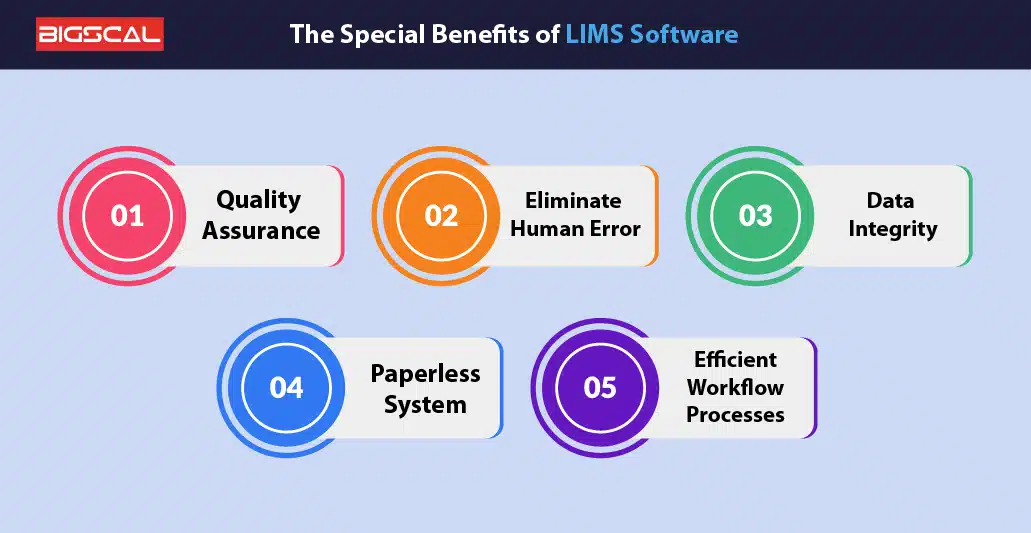
Laboratory information management systems digitize laboratory tools that merge with several data in methodical format. Moreover, the data includes patient records, stock records and sample records. This software improves data quality control and helps to attain the desired goals. There are numberless special benefits, here we discussed below some of them :
Quality Assurance
To enhance the quality of medical inventory, it is important to maintain and track them properly. Furthermore, this software has automatically followed the lab workflow process such as precisely entering procurement details of inventory with vendor information, storing medical stock in appropriate quantity, timely updating data, and maintaining the ideal stock level. The key benefits of quality assurance include :
- Enhancing stock efficiency
- High quality results
- Lowers employer work
- Focus on other critical activities
- Improve patient safety
Eliminate Human Error
With laboratory management software, all tasks have been done through the automated tool that makes the laboratory work simpler and faster than before. Furthermore, the laboratory management system encompasses a number of features such as compliance, sample management process, digital documenting system, asset management software, and monitoring lab information.
Furthermore, the LIMS system helps in practicing security laboratory protocols for minimizing laboratory costing, preventing critical reports, protecting sensitive information, and saves massive time on traveling. Therefore, the LIMS solution helps in improving laboratory operations and is a superior tool for busy laboratories.
Data Integrity
Regularly a variety of information generated in each laboratory. Generally, it is related to patient data, administrative information, stock data, protocol information, and client details. The integrated features ensure safety of records and minimizing potential risks. Therefore, the LIMS software mitigates laboratory costing and facilitates the definite procedure of administering laboratory information. The major advantages of data integrity are :
- Minimizes repetitive data
- Commercial analysis
- Understand the prevalent disease
- Comprehend client’s need
- Maintaining precise information.
Paperless System
Do you want your laboratory paperless and achieve your targets on time?. What are you waiting for? opt laboratory management software now! Adopt quickly and resolve your issues related with physical documents and storing information. Moreover, the data has been entered accurately and processed through automated tools, creating dashboard analytics in a couple of minutes.
This digitized system saves laboratory expenses on procuring stationary and other associated items such as printing, postage costs, and paper. Therefore, saving money helps to improve laboratory infrastructure and enhance coordinating care.
Efficient Workflow Processes
The workflow is different for patients and diverse lab departments. However, each process is interconnected with each other. The clinical process starts from patient registration to payment receipt. Furthermore, the laboratory samples workflow initiates from preparing patients to dispose of with proper lab guidelines. The prominent advantages of efficient workflow process :
- Improve lab efficiency
- Reduces wastages
- Increases productivity
- Reduce transcription errors
- Effective distribution of lab resources.
AI Technology in LIMS Software
Improve your lab innovation and collaboration instantly with lab workers due to the upgrading a lab technology. Furthermore, the LIMS system plays data more deliberately. Receives, process, and trace lab information with some easy steps. Not only clerical level but also a strong supporter of making a perfect clinical decision. AI technology in the LIMS Software is like a cherry on the cake, let’s understand the powerful AI technologies.
Natural language processing
One of the prime factors for sentiment analysis, extracted associate information through the patient feedback. Moreover, the lab software processes user information and generates precise results. AI bots work under the natural language processing algorithm. Moreover, the more accuracy in understanding the client requirement, the better will be the satisfaction score.
Better interpretation of images, queries, and massive amount of data. Moreover, the lab information system is a remarkable technology. Embedded algorithms for better interpretation like rule based systems and machine learning models. Additionally, the best LIMS system helps in complete transformation of data by pre-processing methods.
Machine learning
Unprecedented technology in the laboratory to streamline workflow and adopt for faster results. Able to predict and make decisions based on the data like humans. Furthermore, it has a learning pattern that drives a conclusion on its own and a step forward accordingly. This computing technology has a great impact on data. Provides instant answers on personalized queries and repeated mistakes.
It facilitates great positive outcomes and detects any mistake speedily. Furthermore, the LIMS system software can adapt with a new patient data set, create predicted results based on the prescription and historical information.
Analytical tool
The lab management software is the foundation of digitalization in the lab and fabricates a single dashboard results. Moreover, it gathers substantial data, processes in the best alignment, and builds customizable graphical reports that can be altered based on the requirement. The LIMS system provides the best utility solution for all kinds of lab resources.
Most of the lab companies deploy the laboratory information management system for precise workflow analysis and administers resources unparalleled. Moreover, it assists in implementing regulations based on the lab standard and advancing instrument quality.
Big data management
The laboratory software handles all types of information and retrieves data immediately. Not only depicts but also predicts. Furthermore, it reduces laboratory expenses due to imposition of regulations, when necessary. It improves outcomes, enhances innovation in the labs and increases the patient enrollment.
It helps in on time and precise decision making. Moreover, the LIMS software creates best security, advanced system integration, and upgrading data quality. It augments lab operations, improves lab performance, increases revenue, and minimizes financial burden. Therefore, the LIMS software development company provides automated and feasible solutions.
Image recognition
Examines the pattern and understands the capturing images, easy to detect mistakes and drawing conclusions. Furthermore, the LIMS software speeds up the activity and reduce the high-workload. Ease to construct training information, create a model, training the model, and testing model. Therefore, it helps in classifying images and identifies images based on the object properties. Image recognition in AI-based LIMS can also be paired with OCR, allowing an image to text converter to extract key details from scanned lab reports, sample labels, and requisition forms for faster data entry.
Analyzes images based on the color based theorem. For research purposes, image recognition is the best one. Therefore, it speeds up the procedure of lab research, seamlessly examines patient condition, and drives fast conclusion of test results.
7 Steps Guide of Deploying LIMS Software
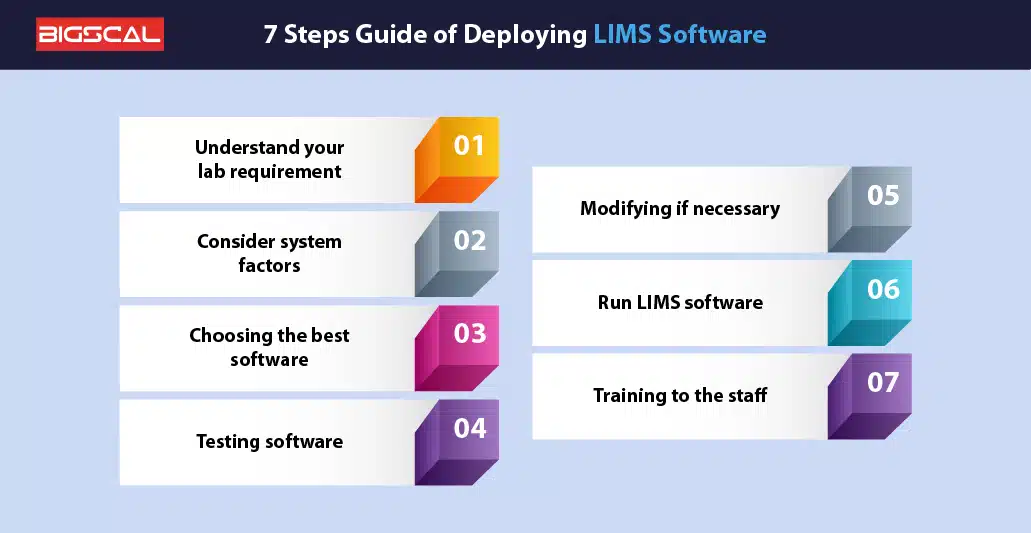
There is immense software available in the market. Thus, it is obvious to have chaos and confusion and Moreover, it requires to meet with senior managerial members of each laboratory segment and listen to their hurdles carefully, which are the barriers to achieving the targets on time. Furthermore, the following seven steps are required to comply with the laboratory information system :
Understand your Lab requirement
The foremost step is to comprehend the segment requirement through interacting with their managers. Moreover, prepare a google sheet and write down their severe and moderate challenges, which are the barrier to improving patient care.
Generally, the common objectives of laboratories are compliant regulations, improving revenue, enhancing patient care, lowering costs, and enhancing productivity. However, it still varies with the different laboratories. Noted that, the objective includes long term, short term, functional, and non-functional.
Consider some factors
After evaluating the specific requirement of the laboratory, it is significant to have some factors on the LIMS platform. Mainly, those attributes are included which are compatible with the laboratory objective. Furthermore, the features include regulatory compliance, sample tracking, automation tools, equipment management system, patient management system, and resource planning system
Additionally, the software must be aligned with the system infrastructure. It is crucial to consider these factors because it is a prime element of changing the laboratory infrastructure for improving the laboratory facilities.
Choosing the best Software
Creating the list of premier LIMS systems, which has a great vendor reputation and matches with your requirement. Furthermore, scrutinizing with the necessary critical factors which are mentioned above. After that, requesting a free trial and properly analyzing each feature. Draft your software budget in advance and select the top one accordingly. Then, it is important to have a written receipt of procuring laboratory software.
Testing software
After choosing the modern LIMS system, testing is the common step for mitigating financial risk. Moreover, check out the platform and mainly, consider the user-friendly feature. if needed. The following are the importance of software testing such as :
- Saves premises costs
- Client satisfaction
- Check software functionality
- Enhancing security
- Examine the software reliability.
Modifying if necessary
This feature is embedded with the testing software. Moreover, properly examine the functionality of selected LIMS software. Furthermore, if you need to add some features and modify functions, well with the developer. The modification may be related to changing the UI/UX design, theme, and required to improve database performance.
Run LIMS software
After modifying the necessary functionality, precisely implementing the laboratory information management systems (LIMS) in your labs. Moreover, the major benefits of the LIMS software solution is to increase efficiency, record vast amounts of lab information, mitigate repeated workflows, and effectively track samples.
Training to the staff
Provide training to your laboratory staff and it is a mandatory step for a reason. Moreover, the staff are the ones who work on this platform, so it is important for them to be familiar with the LIMS platform before doing the practical tasks. Staff Training has several benefits such as :
- Enhancing performance
- Improve attrition rate
- Minimizes error
- Increases lab profits
- Creating a great working environment.
Implement LIMS Software To Effectively Manage Samples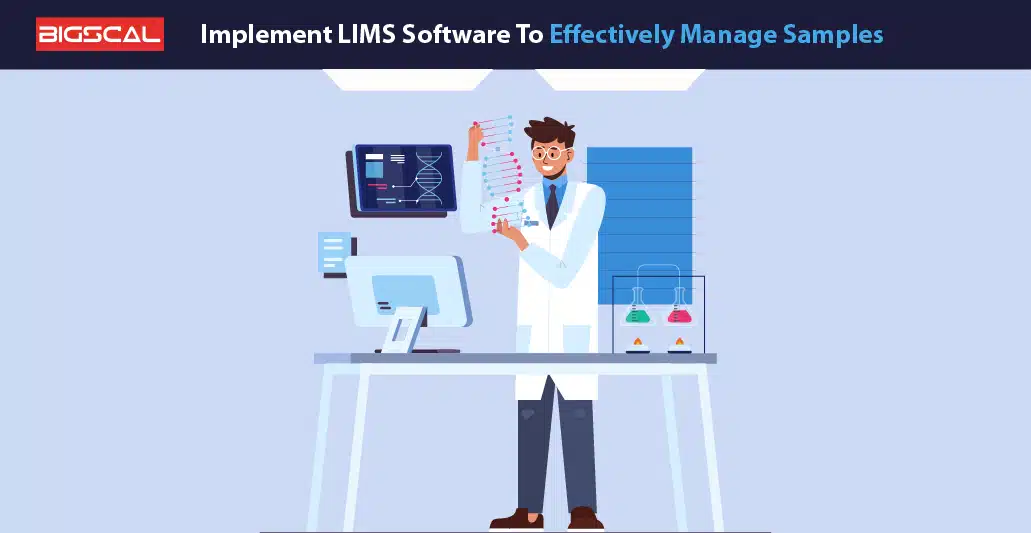
The laboratory management system software helps to speed laboratory activities and improve laboratory documentation. Moreover, this software is embedded with several tools including patient engagement tool, electronic lab notebook, effective data management, and billing tools. Therefore, it enhances workflow efficiency and improves clinical trials. Subsequently, bring down the laboratory expenses.
Most importantly, it includes an electronic laboratory notebook for recorded information with precision. This software completed sample processing with an effective workflow. Furthermore, it begins with recording patient data, entering details of collected samples in a defined format, samples placed at the accessible space, and recorded location data.
After that, automatically calculated patient billing amount according to the disease, and sample report share to patient via digital device. Additionally, it simplifies to trace and edit any sample information.
LIMS Validation
In regulated labs, LIMS validation is the most crucial step that clinics mostly ignore. Validation is about giving proof that the system is working effectively in a lab environment. If clinics skip validation, then they will face challenges with:
- FDA inspection difficulties
- Compliance risk based
- Data integrity challenges
What is LIMS Validation?
LIMS is testing the system to prove that it’s working accurately. This ensures:
Installation Qualification (IQ)
Installation Qualification (IQ) evaluates whether the system is configured appropriately or not. Further, it evaluates the following :
- Hardware setup is precise.
- Operating system is appropriate.
- Network configuration is correct.
In simple words, it checks whether the system environment is ready or not.
Operational Qualification (OQ)
Operational Qualification (OQ) verifies whether the LIMS is capable of performing expected functions or not. Clinics should perform the following:
- Should run the test scripts
- Check every features
- Match the acceptance criteria
In simple words, clinicians should ensure the system is performing in accordance with design.
LIMS Validation Best Practices
For proper validation, clinics should follow:
- Create Validation Master Plan (VMP)
- Maintain Requirements Traceability Matrix
- First clinics need to be validate in test environments
- Store validation records safely
- Revalidate after system update
Validation Responsibility
This is one of the important points:
- What vendor provides → Basic system validation proof (VQD)
- What lab should do? → need to validate configuration and workflows
Benefits of Proper Validation
By following proper validation, a lab can achieve the following:
- Trustworthy evidence
- Smooth auditing procedures
- Risk-free operations.
LIMS and AI – What’s New in 2026
In 2026, AI has transformed LIMS to the next level. Now, LIMS doesn’t just store data; it also anticipates, evaluates, and automates processes.
Predictive Instrument Maintenance
AI models analyze the past performance data of instruments. AI models help labs in the following ways:
- Predict when labs need maintenance
- Sends alerts before machine failures
Result:
- Less downtime
- Accurate results
- Better maintenance planning
Anomaly Detection in Quality Control Data
AI continuously monitors quality data. It helps the lab in the following:
- Detecting small changes and trends.
- Identify the concerns at the earliest phase.
Result:
- Better quality control
- Fewer test failures
Intelligent Sample Routing
AI automates the workflow. It helps the lab department in the following ways:
- Determine a sample volume
- Verify a test complexity standard
- Consider Instrument and staff accessibility
Result:
- Faster processing speed
- Maximum effectiveness
Automated Image Analysis
AI simplifies the work of Pathology and microbiology labs. Further, it helps the lab in the following ways:
- Cell counting
- Colony identification
- Image classification
Result:
- High accuracy
- Time-saving
Robust Functions of Lab Software
The lab software is the first choice of all laboratories due to its unparalleled gains. Moreover, it improves test results, augments collaboration, reduces mistakes, and improves research outcomes. Maximize document efficiency, administer equipment, create a high level of security, and increase productivity. Robust functions of a lab software include:
Stock management
Capturing data of lab instruments, patient information, and prescriptions. Moreover, the laboratory information management system stores accurate data and has powerful analytics for concise detailing.
Additionally, the LIMS software assists in storing diverse instruments and other associated laboratory items in a definite place.
Tracking
Each laboratory operation stores and monitors well. Additionally, it updates each data figure based on the real-time scenario. The LIMS system creates more data precision, reliability, and flexibility in a system.
Additionally, the lab information system is the foundation for precise testing due to the ability of checking information at any time.
Document management
Removing the traditional paper-based method for controlling details and retrieving any particular information. Furthermore, the LIMS system creates a separate folder for each time and saves their data in the unique format.
Therefore, the LIMS software abides with laboratory standards, absolute accuracy, helps in tracing information, and increases data reliability by eliminating errors.
Compliance
Must-have attribute because the abiding regulation is an important to avoid complications and legal penalty. Furthermore, the LIMS software understands that the associated regulations have been legally mandated, stored and applied accordingly.
Consequently, it creates a safe lab environment, increases accountability, and monitors well for avoiding risk.
Personnel management
The most typical and confusing task is to manage human resources and comprises many activities, which makes it more tedious. Moreover, an unified solution creates payroll slips, store employees’ histories, and depicts all attendance in a single dashboard.
Additionally, the laboratory software compares their performance reports based on the last quarter and increases employee experience.
Space management
The lab information management system retains as much information, it alleviates to place instrument devices, small lab equipment, and other necessary stuff of a healthcare staff at a best place. It happens because you know the right quantity and its exact size.
Therefore, it reduces complexities in arranging big devices, saves charges of administering physical documents, and augments efficiency.
Error management
Draft any lengthy document in a minute with more precision figures. Moreover, the LIMS software is a key to unlock the laboratory efficiency and enhance revenue. Eradicates mistakes, improves workflow, and reduces human errors.
Therefore, the LIMS system helps in auditing management, increasing lab efficiency, and improves lab practices.
Improve Workflow Efficiency with the Power of LIMS System
The LIMS system is a holistic lab package due to the domain functionalities and ease to control sample data. Hold a massive and diverse type of laboratory inventory. Moreover, the lab software is capable of maintaining security, driving powerful strategies to strengthen information, and facilitating insightful details for a precise decision.
Connected with different laboratory divisions such as test department, sample department, billing department, and data management department. Therefore, it removes laboratory step for fast achieving goals and enhances output level.
Let’s check out:
1. Sample Registration: Proving Digital Identity To Every Sample
The LIMS workflow starts once the sample is received. LIMS software assigns a unique identifier to every sample. It eliminates the dependency of tracking through manual records. This makes the entire testing journey structured and traceable. Further, LIMS helps in the following:
- Generate Unique Sample ID
- Automate barcodes and labeling
- Capture sample details digitally
- Reduce tracking errors significantly
2. Workflow Configuration: Executing Right Test in Right Sequence
Laboratories’ challenges are not about testing. The key challenge is about executing the testing in the right order. LIMS automatically creates predefined workflows. It helps determine which tests and approvals are required in samples.
- Configure customized testing workflows
- Define proper test execution sequence
- Automate multi-level approval processes
- Minimize delays in laboratory operations
3. Sample Routing: Transferring Information to Right Place
LIMS software slowly eliminates the need for assigning samples manually. System automatically routes the transfer to appropriate instruments, analysts, and testing stations. It automatically improves collaboration and turnaround time. Further, LIMS helps in the following:
- Assign samples to right analysts
- Route samples to testing Instruments
- Organize laboratory testing queues efficiently
- Improve collaboration across laboratory teams
4. Result Capture: Manual Data Entry To Automated Reporting
Data transcription errors create hidden risks for laboratories. It seamlessly integrates with the LIMS instrument and captures the results. Also, it supports structured manual entry. Further, LIMS helps in the following:
- Integrate directly with laboratory instruments
- Import test results automatically
- Support structured manual data entry
- Reduce human data entry errors
5. Result Validation: Making Accuracy A Natural Part
Laboratory reports are valuable only when their accuracy is dependable. LIMS validates the results against predefined standards and specification limits. This makes quality control and compliance a natural part of daily workflows. Further, LIMS helps in the following:
- Validate results against defined rules
- Apply predefined specification limit checks
- Perform automated quality control verification
- Prevent inaccurate laboratory report generation
The Core Architecture: How LIMS Is Built Underneath
1. The Database Layer
It includes the following:
Structured Records
The LIMS software foundation is based on relational database architecture. LIMS organizes all the samples, tests, users, and reports into connected records. This makes the information instantly easily accessible and simple to understand. Further, the database layer provides the following:
- Store structured laboratory data records
- Connect multiple related information records
- Enable faster data retrieval processes
- Reduce dependency on manual documentation
Sample and Client Relationship Mapping
The challenges that laboratories face are not limited to receiving samples. It’s also about maintaining a complete history. LIMS digitally connects all the samples with client and project records. This naturally improves the traceability. Additionally, it helps in the following:
- Link samples with client records
- Associate samples with project information
- Maintain complete sample history records
- Improve end-to-end sample traceability
Test and Specification Management
LIMS does not operate the testing process as random activities. The LIMS system maps every test with predefined methods and specification ranges. This helps laboratories achieve standardized workflows and consistent quality outcomes. Further, it helps in the following:
- Connect tests with approved methods
- Map tests to specification limits
- Standardize laboratory testing procedures consistently
- Support reliable quality assessment processes
2. Workflow Engine
Rules-Based Automation
Above the data layer, the workflow engine works. It determines every sample’s next step on the basis of predefined rules. LIMS reduces the dependency on manual decisions. Additionally, LIMS helps in the following:
- Execute predefined laboratory workflow rules
- Automate sample processing decisions consistently
- Reduce manual workflow management efforts
- Improve operational process efficiency significantly
Sample Type and Test Assignment
Every sample does not require the same testing process. LIMS automatically assigns required test panels according to sample type. This helps laboratories avoid unnecessary steps. And make the processing faster and more precise and accurate. Further, LIMS helps:
- Assign tests based on sample types
- Configure predefined testing panel rules
- Eliminate unnecessary testing activities completely
- Improve sample processing consistency levels
Result Exception and Investigation Triggers
LIMS captures more than results. It can also recognize abnormal conditions. If any results exceed the specification limit. System automatically initiates out-of-specification status and investigation workflows. Further, LIMS software helps in the following.
- Detect results beyond specification limits
- Flag out-of-specification testing outcomes automatically
- Trigger predefined investigation workflows instantly
- Strengthen laboratory quality control processes
3. Integration Layer
System Connectivity
A LIMS includes one integration layer that seamlessly connects all instruments, ERP platforms, electronic health records, and client portals. This layer eliminates manual data re-entry. It makes the information exchange faster and more reliable. Further, the integration layer helps in the following:
- Connect with external laboratory systems
- Integrate with analytical testing instruments
- Exchange data across enterprise platforms
- Eliminate repetitive manual data entry
Instrument and Device Communication
Laboratory instruments continuously generate a huge amount of data. However, transferring manual results creates errors. The LIMS integration layer directly communicates with instruments. It automatically captures and synchronizes the results. Further, the integration layer helps in the following:
- Communicate directly with laboratory instruments
- Capture instrument-generated results automatically
- Synchronize testing data in real time
- Reduce human transcription-related errors
Enterprise System and Record Integration
LIMS does not work like isolated software. It smoothly shares information with Integration layer ERP systems, electronic health records, and business applications. This naturally improves collaboration and visibility among departments. Additionally, an integration layer helps in the following:
- Integrate with enterprise resource platforms
- Connect with electronic health records
- Share information across business systems
- Improve cross-functional data visibility significantly
4. User Interface Layer
Daily Interaction
The most visible part of LIMS software is the user interface. Here analysts and laboratory staff daily interact. User login through this part. Manage the task. Review the results. And, Generate the reports. Further, it enables the following:
- Provide intuitive user interaction screens
- Enable secure user login access
- Display personalized laboratory work queues
- Simplify daily laboratory task management
Analyst Queue and Task Management
In laboratories, multiple samples and testing requests are simultaneously processed. The LIMS user interface clearly reveals to analysts their assigned queues and pending activities. This helps lab specialists easily manage the high-priority task. Also, it makes it easier to execute the daily workflow. Further, it helps in the following:
- Display assigned testing task queues
- Organize pending laboratory activities efficiently
- Prioritize sample processing requirements automatically
- Improve analyst productivity and focus
Report Generation and User Accessibility
The LIMS interface generates final reports. It plays an important role in making the information access simple. Users can quickly retrieve required reports. Further, it helps in the following:
- Generate detailed laboratory test reports
- Provide quick information retrieval capabilities
- Enable easy report access workflows
- Support seamless user experience requirements
LIMS vs Laboratory Information System (LIS)
It is highly crucial to comprehend the difference between LIS and LIMS. This will help lab specialists choose the right system.
| Aspect | LIMS | LIS |
|---|---|---|
| Primary Focus | Sample management | Patient data management |
| Industry | Research, manufacturing, quality control | Healthcare, clinical labs |
| Sample Type | Research samples, materials | Patient specimens |
| Integration | Instruments, inventory | EMR, HIS, billing |
| Compliance | ISO, quality standards | HIPAA, medical regulations |
How LIMS Software Works: The Complete Workflow
Let’s understand each step:
Step 1: Sample Collection and Initial Information Capture
LIMS software digitally captures source, collection date, collector details, and sample type. Further, it performs the following:
- Capture complete sample source information
- Record collection date and time
- Store collector and sample details
- Improve initial sample traceability
Step 2: Barcode Generation and Sample Identification
LIMS software automatically generates unique barcodes. Here every sample gets one digital identity. Further, it performs the following:
- Generate unique sample barcode automatically
- Print barcode for sample containers
- Enable scanning across laboratory workflows
- Reduce manual labeling-related errors
Step 3: Digital Login and Centralized Registration
LIMS software digitally registers the samples in the system. And store all the metadata in a centralized database. This process naturally gives real-time visibility and end-to-end sample tracking capabilities to laboratories. Further, lab management software performs the following:
- Scan samples into digital system
- Store metadata in centralized database
- Assign unique tracking identification numbers
- Improve sample visibility and accessibility
Step 4: Work Assignment and Sample Tracking
LIMS software automatically organizes assignments and tracking. In the phase, LIMS performs the following:
- Assign samples to right technicians
- Set priority levels for testing
- Optimize laboratory queue management processes
- Track sample movement in real time
Step 5: Status Updates and Workflow Visibility
LIMS automatically logs every workflow stage. It provides sample progress visibility to stakeholders. In this phase, LIMS executes the following:
- Log sample status changes automatically
- Display workflow stages to users
- Send notifications for critical milestones
- Improve laboratory communication and coordination
Step 6: Protocol Execution and Quality Control
LIMS guide technicians through standardized protocols. It enforces quality checks on every stage. This approach improves testing consistency. LIMS software performs the following in this phase:
- Provide standardized testing protocol guidance
- Capture results directly into the system
- Validate results at every stage
- Compare outcomes with expected ranges
Step 7: Instrument Integration and Automated Data Capture
LIMS automatically integrates with instruments and captures the results. This reduces manual data entry and associated inaccuracies. In this phase, LIMS performs the following:
- Integrate directly with laboratory instruments
- Record the automatically generated test results
- Reduce manual data entry errors
- Improve accuracy of laboratory records
Step 8: Centralized Data Storage and Compliance Management
LIMS stores all the test results and quality metrics in secure databases. LIMS preserves historical records. Maintain audit trails. Naturally support compliance requirements. In this phase, LIMS performs the following:
- Store results in secure databases
- Link data with original samples
- Maintain complete compliance audit trails
- Prevent data loss through backups
Step 9: Report Generation and Result Distribution
LIMS generates customized reports. LIMS share the reports with physicians, patients, clients, and laboratory teams. This makes the reporting process faster and more convenient. In this phase, LIMS performs the following:
- Generate customizable laboratory test reports
- Format reports for different stakeholders
- Share reports through digital channels
- Support electronic signatures for compliance
Step 10: Downstream Analysis and Trend Detection
After completing the above phase, LIMS software analyzes historical data. It identifies the pattern. This helps labs make better decisions. Derives valuable research insights. Overall, LIMS performs the following:
- Detect trends across multiple tests
- Identify patterns within laboratory datasets
- Support research-driven analytical insights
- Improve data-based decision-making
Conclusion
The LIMS software is the marvelous tool for modern laboratories because of its lucrative attributes and special benefits. Furthermore, the advantages include quality assurance, eliminating human error, data integrity, paperless system, and efficient workflow process. Furthermore, it is required to adhere to some steps for LIMS implementation such as understanding your lab requirement, consider some factors, choosing the best software, testing the software, modification, run LIMS software, and staff training. Therefore, it saves efficient time and immense workforce energy.
FAQ
What are the primary functions of data processing management?
Data is the vital element of the healthcare organization as it supports making instant decisions and proper accurate information would protect clients from their exploitation. Moreover, the core functions of data management are storage optimization, integrity, back-up management, data retrieval system, quality data, and business intelligence reports. Therefore, it minimizes healthcare costs, simpler to share information, aids to enhanced output and facilitates security of laboratory documentation.
Which are the leading LIMS solutions in India?
Healthray is the ultimate LIMS solution in India. This software is the premier due to its uncountable benefits and best functionalities. Moreover, it heightens laboratory productivity, mitigates expenses, embedded with various segments, and accurately follows regulations. Improve workflow from customer enrolment to the electronic receipt. Ultimately, it enhances client contentment and helps to provide the fullest advantages to laboratory organization.
How does LIMS software improve efficiency?
The laboratory information management system software has the advanced attributes that provide the advantages to all lab divisions. Furthermore, there are several types of divisions such as client department, resource department, tasks department, protocol management department, inventory management department, sample department, and query department. Additionally, it automizes the laboratory system from maintaining documents to generate reports of test results.
What are the principal factors to remember while selecting lab software?
The laboratory software developed to address the prevalent challenges of laboratories. Furthermore, the prominent challenges are related with laboratory productivity, high expenses of lab, regulations, information management, delay work and attaining department objectives. Furthermore, the key factors to scrutinizing your laboratory management software are compatibility with system hardware, scheduling tool, revenue management tool, figure out your laboratory budget, and stock controlling tool. Therefore, laboratory information management systems increase work efficiency and ultimately, improve lab output.
What are the vital advantages of laboratory data management?
The laboratory data management is too large and needs updating continuously, which is tiresome tasks. Furthermore, this software facilitates a master database, which compiles a large amount of information from patient sensitive details to the laboratory bills. Moreover, data management helps to provide severe protection from cyber attackers from stealing and manipulating information. It is excellent at data quality, and simpler to make practical conclusions of the particular solution.
What are the integrated attributes of the new LIMS system?
The new laboratory information management system makes your laboratory modern and supports executing each task effectively. Furthermore, this software has a wide range of functions such as intelligence dashboard, Ai integration, workflow management, invoicing management, quality assurance, study management, and implementing protocols. Therefore, it increases efficiency, enhancing output, and adherence to legal protocols.
Is the LIMS software embedded with lab instruments?
Indeed, the laboratory information management system software is embedded with lab instruments. Moreover, it helps to note down the equipment readings and their procurement information. It records maintenance date, repairing date, optimal quantity level, using stock, finishing stock, stock storage information and replacing conditions. Also, it provides immediate alerts when there is a last date of maintenance time and shortage of the specific stock.
What is the main objective of lab management software?
The laboratory software is described through the name as it is particularly for augmenting laboratory operations. It entirely administers your lab activities. Furthermore, the activities may be related to managing the clinical department or instrument department. It helps in boosting productivity, enhancing laboratory efficiency, tracking instruments, and minimizing invoicing error.
Does the laboratory information management system aid in sample traceability?
Indeed, the laboratory information management system aids in sample traceability. The sample monitoring is not merely a feature but it is a systematic procedure. In this process, data entered with accuracy and lowered repetitive mistakes through integrated robotic tools. Implementing the data governance rules and timely altering data.
What are the guided steps of implementing LIMS software?
The LIMS solution is important to deploy in laboratories on account of its integration functionalities. The guided steps of implementing the LIMS software are determining your laboratory requirement, drafting proper planning, considering specific factors, choosing the leading software, testing software, modifying if necessary, running LIMS software, and accurate staff training. Therefore, it minimizes laboratory costs and skyrocket efficiency.