The Complete Guide to Building Educational Apps in 2026: From Concept to Launch
Quick Summary: Building an educational app takes ten main steps: define your goal and audience, research the market, choose features, plan content, create wireframes, pick a technology, build an MVP, test with real learners, launch and keep improving. This 2026 guide walks through each step and covers the main types of educational apps, must-have features, AI in learning apps, privacy rules for student and children’s data, monetization models, costs and how to choose a development partner.
Introduction
“Education is not a problem. Education is an opportunity.” – Lyndon B. Johnson
Learning apps have turned that opportunity into something people carry in their pockets. Students use them to practice math and languages, teachers use them to share lessons and track progress, and companies use them to train employees. The pandemic accelerated this shift, and today mobile learning is a normal part of education at every level.
For educators, edtech startups and institutions, a well-built app can reach learners anywhere, personalize lessons and make learning more engaging. But building a successful educational app takes more than good content: it needs the right features, an engaging experience, strong privacy protection and a clear business model.
This guide covers everything you need to know, from idea to launch, whether you are a teacher, a founder or a school planning your own app.
What Is Educational App Development?
Educational app development is the process of designing, building and launching mobile or web apps that help people learn. It is a specialized area of education software development that combines teaching expertise with software design.
Like other app projects, it includes research, UI/UX design, development, testing and release. Educational apps also need careful instructional design, so lessons are clear and well structured, and accessibility, so learners with disabilities can use them. Following the Web Content Accessibility Guidelines (WCAG) helps make sure features such as text size, contrast, captions and screen reader support work for everyone.
Types of Educational Apps
Educational apps serve many purposes and audiences. If you are still exploring what to build, see our list of educational app ideas for startups.
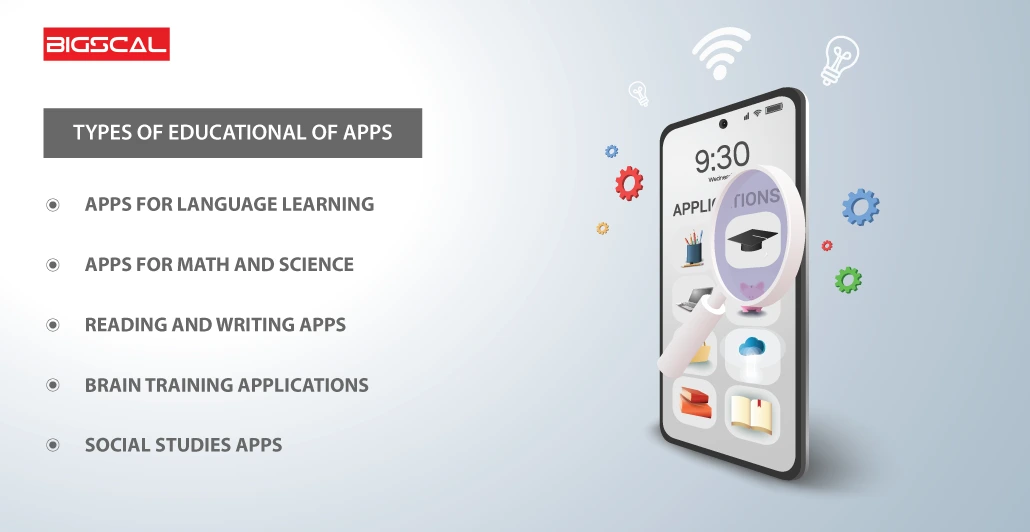
The most popular types are:
1. Language Learning Apps
Language apps offer bite-sized lessons, speaking and listening practice, and daily goals that build fluency over time. Duolingo and Babbel are well-known examples.
2. Math and Science Apps
These apps help students with subjects many find difficult, through step-by-step explanations, practice problems and interactive simulations. Photomath, Khan Academy and Quizlet are popular choices.
3. Reading and Writing Apps
Reading and writing apps give access to books and articles and help learners improve vocabulary, grammar and writing. Examples include Grammarly, Scribd, Wattpad and Editpad, along with academic writing support services such as MyAssignmentHelp.
4. Brain Training Apps
Brain training apps use games and puzzles to exercise memory, attention and problem-solving. Lumosity, Elevate and BrainHQ are well-known examples.
5. Social Studies Apps
These apps bring geography and history to life with interactive maps, timelines, documents and quizzes. Google Earth and National Geographic’s apps are popular examples.
6. Learning Management and Classroom Apps
Platforms such as Google Classroom and Moodle help schools and teachers share materials, set assignments, grade work and communicate with students and parents.
7. Exam Preparation and Online Course Apps
Test prep and course apps, such as Coursera and Udemy, offer structured courses, video lessons, mock tests and certificates for students and professionals.
Must-Have Features of an Educational App
| Feature | Why it matters |
|---|---|
| User profiles and onboarding | Personalizes the experience from the first session |
| Video and interactive lessons | Makes content engaging and easy to follow |
| Quizzes and assessments | Helps learners check understanding and remember more |
| Progress tracking dashboards | Shows learners, parents and teachers how they’re doing |
| Gamification | Points, badges and streaks keep learners coming back |
| Offline mode | Lets students learn without a constant internet connection |
| Notifications and reminders | Encourage regular practice |
| Teacher and parent tools | Assign work, monitor progress and communicate |
| Accessibility features | Captions, text resizing and screen reader support |
| Secure payments | Supports subscriptions and in-app purchases |
Steps To Build an Educational App
Follow these steps to take your app from idea to launch:
1. Define Your Goal and Audience
Decide what problem your app solves and for whom: young children, school students, university learners, professionals or teachers. Their age, goals and devices will shape every other decision.
2. Research the Market
Study competing apps, read their reviews and note what users love and what they complain about. Look for gaps your app can fill.
3. List Your Features
Choose the features your learners really need for a first version, such as lessons, quizzes, progress tracking or collaboration tools. Keep the first release focused.
4. Plan Your Content
Work with teachers or subject experts to design the curriculum, lesson structure and assessments. Good content is what makes learners stay.
5. Create Wireframes and Designs
Wireframes show the app’s screens and navigation. Test them with real users before development, then turn them into a polished, age-appropriate design.
6. Choose Your Technology
Native apps (Swift for iOS, Kotlin for Android) give the best performance, while cross-platform frameworks such as Flutter and React Native let you build for both platforms from one codebase. Many education apps also need a web version and a backend for content, accounts and analytics. An experienced educational app development company can help you choose.
7. Build an MVP
Start with a minimum viable product (MVP) that includes only the core features, so you can launch sooner and learn from real users.
8. Test With Real Learners
Test usability, content and performance with a group of target users, including teachers and parents where relevant. Use their feedback to improve the design, content and features.
9. Launch on the App Stores
Publish your app on Google Play and the App Store, following their policies, especially the extra rules for apps aimed at children. Plan marketing to reach schools, parents or learners.
10. Maintain and Improve
Track usage and learning outcomes, fix bugs, update content and add features regularly to keep learners engaged.
AI in Educational Apps
AI is changing what learning apps can do:
- Personalized learning paths that adapt difficulty and content to each student’s progress.
- AI tutors and assistants that answer questions and explain concepts in simple language.
- Automatic grading and feedback on quizzes and written answers.
- Speech recognition for pronunciation practice in language apps.
- Content generation that helps teachers create practice questions and summaries.
AI features should always be reviewed for accuracy and age-appropriateness, with clear rules on how student data is used.
Privacy and Compliance for Educational Apps
Educational apps often handle data about children and students, so privacy must be part of the design from day one. Depending on your audience and markets, you may need to follow:
- COPPA in the US, which requires parental consent before collecting personal information from children under 13.
- FERPA in the US, which protects student education records held by schools.
- GDPR in Europe and India’s DPDP Act, which set rules for personal data, including children’s data.
- App store rules, such as Google Play’s Families policy and Apple’s Kids Category guidelines, which limit ads and data collection in children’s apps.
Why App Development Matters for Education
Educational apps became essential during the COVID-19 pandemic and have stayed central to how people learn. Many schools and edtech companies work with outside development teams to build them; read more about the benefits of software outsourcing by industry.
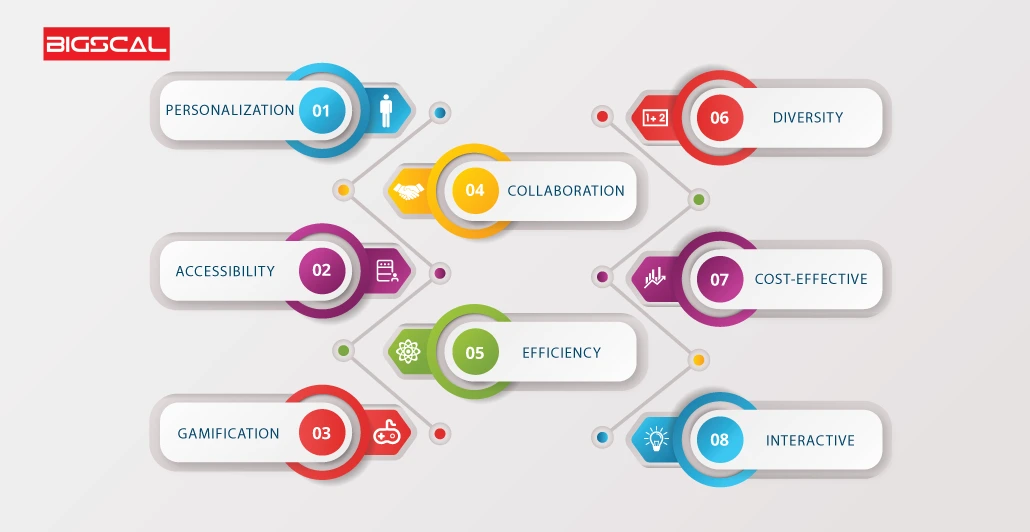
The main benefits of educational apps are:
1. Personalization
Apps adapt to each learner’s pace and level, helping students understand topics better and remember them longer.
2. Accessibility
Learners can study anytime and anywhere, which helps students in remote areas and those balancing work or family.
3. Gamification
Game elements such as points, levels and rewards make learning more fun and motivate students to keep going.
4. Collaboration
Apps let students and teachers share materials, discuss topics and work on projects together.
5. Efficiency
Automatic grading, progress tracking and reports save teachers time for teaching and individual support.
6. Variety
Apps offer videos, simulations, readings and quizzes, so students can explore subjects in different ways.
7. Lower Costs
Digital content can be cheaper than printed textbooks and workbooks, which helps schools and students on tight budgets.
8. Interactivity
Quizzes, puzzles and simulations help students apply what they learn and build deeper understanding.
How Educational Apps Make Money
- Freemium: free basic content with paid premium lessons or features.
- Subscriptions: monthly or yearly access to all content.
- One-time purchases: paid courses or content packs.
- B2B licensing: selling access to schools, universities or companies.
- Certificates: charging for verified course completion certificates.
Ads are generally a poor fit for children’s apps and are tightly restricted by app store rules.
How To Choose the Right Educational App Development Company
Every journey needs a skilled guide. The right development partner will help you design, build and launch an app that achieves your learning and business goals.
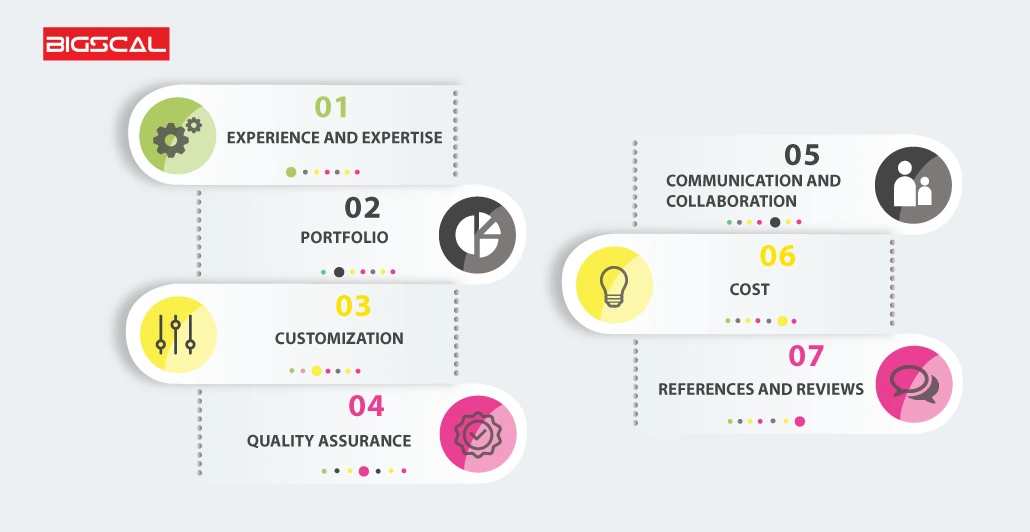
Consider these factors:
1. Experience in Education
Look for a company that has built educational apps before and understands learners, teachers and instructional design.
2. Portfolio
Try apps the company has built and check their design quality, usability and reviews.
3. Customization
Make sure the team can build features around your specific curriculum, audience and goals.
4. Quality Assurance
Ask how they test apps for bugs, performance, accessibility and usability across devices.
5. Communication
Choose a partner that communicates clearly, shares regular progress and involves you in key decisions.
6. Privacy Expertise
Check their experience with COPPA, FERPA, GDPR or DPDP, especially if your app is for children or schools.
7. Cost and Value
Compare itemized quotes and what each includes. The lowest price isn’t always the best value.
8. References and Reviews
Read client reviews and speak to past clients, especially schools or edtech companies.
How Much Does It Cost To Build an Educational App?
Costs depend mainly on features, platforms, design and content. These ranges are typical market estimates:
| App type | Examples | Typical cost range |
|---|---|---|
| Simple app | Quiz app, flashcards, basic lessons | $15,000 to $40,000 |
| Medium-complexity app | Video courses, progress tracking, subscriptions | $40,000 to $100,000 |
| Complex platform | Live classes, AI tutors, LMS features, web and mobile apps | $100,000 and above |
The main cost factors are:
- Features and complexity: more features and integrations mean higher costs.
- Platforms: building for iOS, Android and web costs more than one platform, though cross-platform frameworks reduce this.
- Design: custom, highly interactive designs cost more than simple layouts.
- Content: creating videos, animations and courses adds to the budget.
- Testing and compliance: thorough testing and privacy requirements add time but are essential.
Conclusion
A successful educational app starts with a clear learning goal and a deep understanding of its users. From there, the right features, engaging content, strong privacy protection and continuous improvement turn a good idea into an app learners love.
Bigscal has experience building education and eLearning software for schools, institutions and edtech startups. If you are planning an educational app, explore our education software development services or contact us to discuss your idea.
FAQ
How do you create an educational app?
Define your app’s goal and audience, research competing apps, choose your core features, plan the content with subject experts, create wireframes, pick a technology, build an MVP, test it with real learners, launch on the app stores and keep improving based on feedback.
What does it take to develop an educational app?
You need a team that combines subject experts or teachers, UX designers, mobile and backend developers, and testers, along with high-quality learning content and a plan for privacy compliance, especially if the app is for children.
How do you create an educational app for Android?
Build it natively with Kotlin in Android Studio, or use a cross-platform framework such as Flutter or React Native to target Android and iOS together. Design an easy-to-use interface, test on a range of devices, and publish on Google Play following its policies, including the Families policy for children’s apps.
How much does it cost to make an educational app?
A simple educational app typically costs $15,000 to $40,000, a medium-complexity app with video courses and subscriptions $40,000 to $100,000, and a complex platform with live classes or AI features $100,000 or more.
Are educational apps profitable?
They can be. Successful educational apps usually earn through freemium models, subscriptions, paid courses or licensing to schools and companies. Profitability depends on solving a real learning need, keeping users engaged and choosing the right business model.
What privacy rules apply to educational apps for children?
In the US, COPPA requires parental consent before collecting personal data from children under 13, and FERPA protects student records. GDPR and India’s DPDP Act also set rules for children’s data, and app stores have extra policies for children’s apps that limit ads and data collection.